
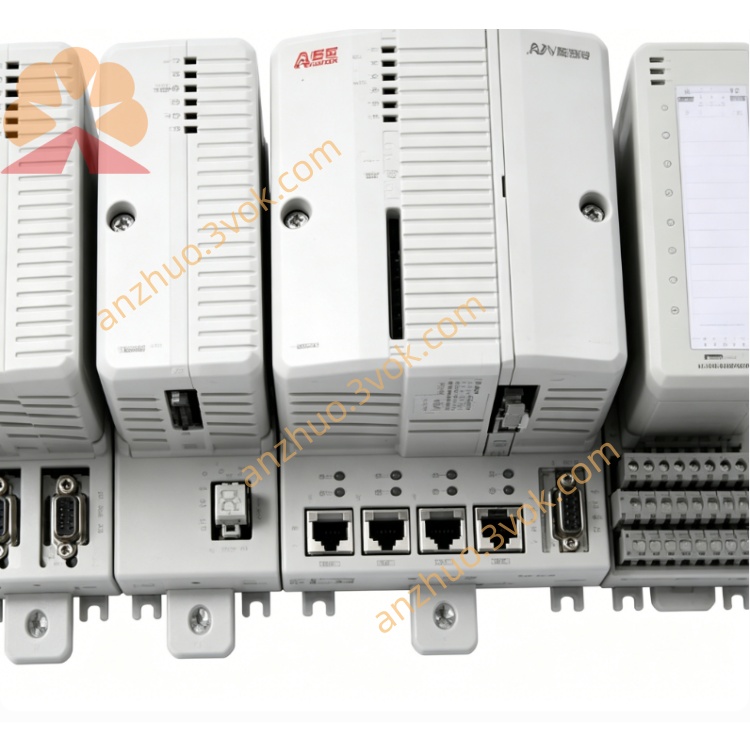
ABB 07KP94 (AC31/Advant OCS Series) high‑performance multi‑protocol communication processor
ABB 07KP94 is a high-performance multi-protocol communication processor designed for ABB Advant Controller 31 and Advant OCS systems. It is equipped with one Ethernet port and one isolated serial port. This module connects AC31 controllers with Modbus TCP/RTU devices, SCADA, DCS and third-party industrial equipment, and realizes protocol conversion and data forwarding functions.
Description
Product Introduction
ABB 07KP94 is a high-performance multi-protocol communication processor designed for ABB Advant Controller 31 and Advant OCS systems. It is equipped with one Ethernet port and one isolated serial port. This module connects AC31 controllers with Modbus TCP/RTU devices, SCADA, DCS and third-party industrial equipment, and realizes protocol conversion and data forwarding functions.
Model Explanation
07 represents the AC31 and Procontic 90 series product platform. KP stands for communication processor. 94 refers to the hardware version with integrated Ethernet and serial dual interfaces and extended protocol functions. The standard part number is GJR5254000R1161.
Technical Parameters
The rated power supply is 24 VDC with an operating range from 19.2 VDC to 30 VDC, and it is built with reverse polarity protection. The typical operating current is 350 mA and the maximum current is 400 mA. It adopts a 32-bit industrial main controller with a main frequency of 250 MHz. The module is configured with 4 MB flash memory for storing firmware and configuration data, and 1 MB RAM for data buffering. It provides one 10/100 Mbps Ethernet interface and one isolated RS-485 serial interface. Supported protocols include Modbus TCP acting as server or client, Modbus RTU acting as master or slave, as well as ABB exclusive RCOM and CS31 protocols. The baud rate of the serial port ranges from 300 bps to 115200 bps. The isolation voltage between the serial port and the backplane is 1500 VAC, and the isolation voltage between the Ethernet port and the backplane is 500 VAC. The operating temperature ranges from -25 degrees Celsius to 60 degrees Celsius, and the storage temperature ranges from -40 degrees Celsius to 85 degrees Celsius. It supports installation on standard 35 mm DIN rail or AC31 system rack slots. The overall dimensions are 51 mm in width, 110 mm in height and 75 mm in depth, and the net weight is approximately 0.55 kg. The product has passed CE, UL and RoHS certifications, and ATEX certification is available as an optional item.
Interface and Communication Configuration
The Ethernet port adopts RJ45 connector with 10/100 Mbps auto-adaptation and auto MDI-X function, which is used for Modbus TCP and general TCP/IP network communication. The serial port is designed with terminal block and supports RS-485 signal for Modbus RTU, RCOM and CS31 bus connection. A mini-USB port is reserved for local parameter configuration via supporting software. The module is fitted with multiple status indicators. The green PWR light is on when the power supply works normally. The yellow ETH light flashes to indicate Ethernet link and data transmission activity. The yellow COM light displays the transceiving status of serial signals. The red ERR light lights up when communication timeout, parity error or configuration mismatch occurs. Shielded twisted pair cables are recommended for RS-485 wiring, and CAT5e or CAT6 network cables are used for Ethernet connection. All cable shielding layers shall be grounded at one end only, and signal cables shall be laid separately from high-voltage power cables.
Core Functions
It supports simultaneous communication of Ethernet and serial ports with multiple protocols, meeting the access requirements of different network devices. It can complete mutual conversion between Modbus TCP, Modbus RTU and ABB exclusive protocols to realize interconnection between new and old systems. The reinforced electrical isolation design effectively suppresses electromagnetic interference and eliminates ground loop problems, adapting to harsh industrial field environments. With high-speed transmission performance of 100 Mbps Ethernet and 115200 bps serial port, it ensures real-time data transmission for control and monitoring. It provides complete running status indication and system diagnosis functions, and supports manual or automatic Ethernet network switching to improve system reliability.
Application Scenarios
It is widely used to connect AC31 controllers with frequency converters, measuring instruments, sensors and human-machine interfaces that adopt Modbus protocol, and build data links with upper SCADA and DCS systems in manufacturing, power and process industries. It is applicable to the renovation and upgrading of legacy Procontic T200 and MasterPiece 200 systems, and keeps the original RCOM and CS31 field equipment running normally. It is the ideal choice for industrial sites with mixed Ethernet and serial communication networks such as water treatment, chemical and power plants. It supports remote monitoring and remote control of on-site equipment through Ethernet Modbus TCP. It also applies to production lines in automobile, food, beverage and packaging industries with multi-brand automation devices.
Usage and Maintenance Instructions
Install the module on 35 mm DIN rail or insert it into the standard slot of AC31 rack, keep vertical placement and reserve enough ventilation space of 50 mm around. Connect the 24 VDC power supply correctly, lay RS-485 and Ethernet cables in accordance with specifications, and the maximum transmission distance of RS-485 is 1200 meters while the maximum length of Ethernet cable is 100 meters. Complete parameter setting including IP address, subnet mask, gateway, communication protocol, baud rate, station address and master-slave mode via AC31 Control Builder software. Enable the built-in 120 ohm termination resistor of RS-485 only at the two extreme ends of the communication bus. Check the working status of indicators every quarter, and inspect the tightness of terminals, cable integrity and shielding performance every year. When communication faults appear, firstly check power supply and wiring conditions, confirm IP address conflict and bus termination settings, and re-download configuration files if necessary.
Get a Quote